

Description
Download YARC – Chrome REST Client, API Testing Tool
Overview
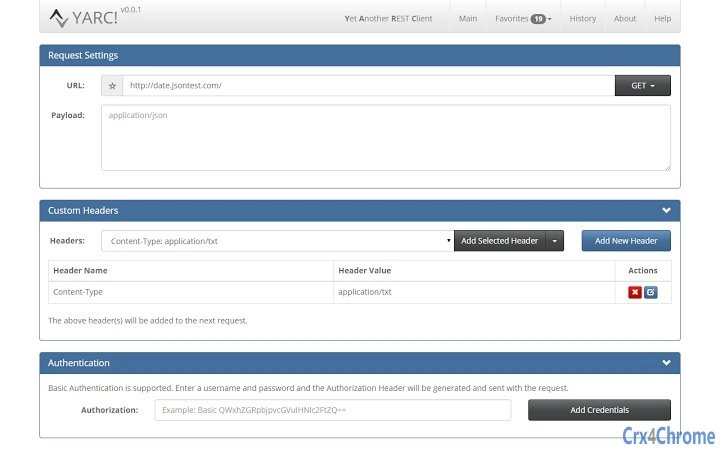
YARC (Yet Another REST Client) is a lightweight, browser-based tool designed for developers who need to interact with RESTful APIs directly within Google Chrome. Built specifically as a Chrome extension, it enables users to send HTTP requests, inspect responses, and streamline API development, testing, and debugging workflows. The software is ideal for frontend and backend developers, DevOps engineers, and QA testers who frequently work with web services. It supports a wide range of HTTP methods including GET, POST, PUT, DELETE, PATCH, HEAD, and OPTIONS, and allows users to customize request headers and payloads. The developer, YARC Team, has prioritized usability and seamless integration with the Chrome ecosystem. Real-world use cases include validating API endpoints during development, testing authentication flows, and debugging response issues in real time. The tool operates entirely within the browser environment, making it accessible without complex installations or system-level configurations.
Key Features & Capabilities
- Favorite Requests: Save frequently used API calls—including headers, body content, and query parameters—with one click. Favorites are automatically synced across devices via the user’s Google account, ensuring consistent access regardless of the machine being used.
- Request History: Maintain a complete log of past requests and responses. Users can filter, search, and re-execute previous calls, which improves efficiency during iterative testing cycles.
- Custom Headers: Access a built-in library of common HTTP headers and create personalized ones for consistent use across projects. Saved headers can be reused across multiple requests.
- Syntax Highlighting: View responses in formatted views for JSON, XML, HTML, and CSS with color-coded syntax highlighting, improving readability and error detection.
- Performance Metrics: Track the duration of each request to identify latency issues or slow endpoints during performance testing.
- Authentication Support: Built-in support for HTTP Basic Authentication simplifies testing secured endpoints.
- Extensible Request Methods: Users can define custom HTTP methods, allowing flexibility for non-standard or experimental API behaviors.
- Responsive Design: The interface adapts seamlessly to different screen sizes, ensuring usability on both desktop and tablet devices.
User Interface, Workflow & Performance
The user interface of YARC is clean, intuitive, and designed for rapid API interaction. The main panel is divided into logical sections: request method selector, URL input, header editor, request body, and response viewer. Navigation is straightforward, with clearly labeled tabs and a minimal learning curve. The workflow is optimized for developers who need to send quick requests and analyze results without distractions. The extension integrates directly into Chrome’s developer tools environment, allowing for efficient switching between debugging and testing. Performance is consistent with typical Chrome extension behavior—lightweight and responsive. The developer did not specify resource usage details, but given the 5.2 MB size and browser-based execution, it is expected to have minimal impact on system performance. Stability appears strong, as the tool operates within Chrome’s sandboxed environment, reducing the risk of crashes or conflicts. No reported issues with memory or CPU consumption were mentioned.
Compatibility & System Requirements
YARC is designed to run on all platforms that support Google Chrome, including Chrome OS, Windows, Mac, and Linux. It functions exclusively as a Chrome extension, meaning it requires a compatible version of Chrome to operate. The software version is 1.0.1, with an installation size of 5.2 MB. The developer did not provide additional system requirements, so users should ensure their device runs a current version of Chrome. Compatibility with older Chrome versions is not specified. Since the tool is browser-based, it does not require dedicated system resources beyond those needed for Chrome itself. Platform compatibility information is limited to the listed operating systems, and no additional hardware requirements were stated.
Pros and Cons
Pros
- Free to use with no hidden costs or ads
- Seamless Google account synchronization for favorites and history
- Supports all major HTTP methods and custom request types
- Intuitive interface designed for fast API testing
- Real-time syntax highlighting for multiple data formats
- Lightweight and fast, with minimal system footprint
- Responsive design works across devices
- Secure operation within Chrome’s sandboxed environment
Cons
- Only available for Chrome, limiting cross-browser use
- Dependent on Chrome’s stability and update cycle
- Does not support offline mode without a prior connection
- Permission request may appear concerning to some users
- No built-in environment or variable management
FAQ Section
Is YARC compatible with all versions of Chrome?
YARC is designed for current versions of Google Chrome. Compatibility with older or outdated versions is not guaranteed, and users should ensure Chrome is up to date for optimal performance.
Is YARC safe to use with sensitive API data?
Yes. The tool operates within Chrome’s secure sandbox and does not store or transmit user data beyond what is necessary for request execution. The developer confirms it does not access or use user data.
Can I use YARC offline?
While the extension can be accessed after installation, it requires an active internet connection to send requests. No data is cached for offline use, so full functionality depends on connectivity.
Does YARC support environment variables or multiple environments?
Currently, the software does not include environment variable management or multi-environment support. Users must manually adjust URLs and headers for different environments.
How often are updates released?
Updates are released by the YARC Team as needed to fix bugs, improve compatibility, and add new features. The latest version is 1.0.1, with no specific update schedule disclosed.
Final Thoughts + CTA
YARC delivers a focused, efficient, and free solution for developers who need a reliable REST client within the Chrome ecosystem. Its clean interface, automatic sync, and support for essential API testing features make it a strong choice for both beginners and experienced developers. While its Chrome-only availability and lack of advanced features like environment management may limit some power users, the core functionality is solid and well-executed. For those already using Chrome for development, YARC integrates seamlessly into existing workflows without overhead. It’s a secure, lightweight, and effective tool that enhances productivity without compromising on simplicity. Download YARC now and streamline your API testing process with confidence.
Download YARC now
Guides & Tutorials for Yet Another REST Client App for Chrome
How to install Yet Another REST Client App for Chrome
- Click the Preview / Download button above.
- Once redirected, accept the terms and click Install.
- Wait for the Yet Another REST Client App for Chrome download to finish on your device.
How to use Yet Another REST Client App for Chrome
This software is primarily used for its core features described above. Open the app after installation to explore its capabilities.
User Reviews for Yet Another REST Client App for Chrome 0
No reviews found





